

图形驱动框架
1.整体框架
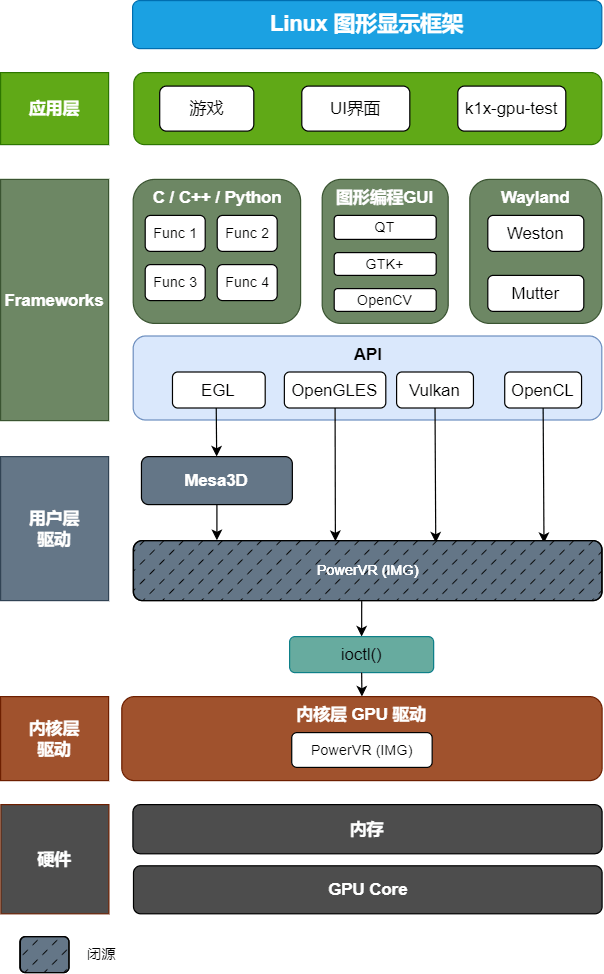
2.环境配置及依赖
2.1 kernel
进入 linux kernel 源码目录,在 config 中将PowerVR打开:
CONFIG_POWERVR_ROGUE=y #将PowerVR_rogue打开
或在 menuconfig 中进行配置:执行make menuconfig,如下图所示,进入配置界面,在 Device Drivers -> Graphics support -> PowerVR GPU 路径下打开 PowerVR GPU 选项。
<*>   Lontium LT9711 DSI to DP
< > null drm disp
<*> PowerVR GPU #打开 PowerVR GPU 选项
[ ] Enable legacy drivers (DANGEROUS)  ----
    Frame buffer Devices  --->
2.2 PVR DDK
由于版权问题,PVR GPU的驱动开发工具包(Device Development Kit, DDK)不能提供出来,PVR GPU驱动的用户层闭源代码使用 so 动态库的形式提供了OpenGLES、Vulkan和OpenCL的API实现。在bianbu-linux和bianbu-desktop上开启PVR GPU驱动的方式如下:
-
在 bianbu-linux 上,需要在编译 build root 时设置 config 文件中 BR2_PACKAGE_IMG_GPU_POWERVR=y;或者在 bianbu-linux 源码目录下,执行 make menuconfig,在 External options -> Bianbu config 路径下打开 img-gpu-powervr 选项。
[*] rtk hciattach
    *** spacemit mpp package ***
-*- spacemit mpp
[*] img-gpu-powervr #打开 img-gpu-powervr 选项
    Output option (Wayland)  --->
[ ] install examples -
在 bianbu-desktop上,涉及到版权问题的闭源代码使用 so 动态库的形式通过 img-gpu-powervr deb包来提供。用户可通过 apt install img-gpu-powervr 来获得 PVR GPU 驱动程序的使用。需要注意的是,GPU内核层驱动与用户层驱动版本需保持一致,版本查看方法如下:
# 查看内核层驱动
➜  ~ journalctl -b | grep "Initialized pvr"
11月 21 14:11:37 spacemit-k1-x-MUSE-Pi-board kernel: [drm] Initialized pvr 24.2.6603887 20170530 for cac00000.imggpu on minor 1 # 版本为24.2
# 查看用户层驱动
➜  ~ dpkg -s img-gpu-powervr
Package: img-gpu-powervr
Status: install ok installed
Priority: optional
Section: graphics
Installed-Size: 70314
Maintainer: bianbu <bo.deng@spacemit.com>
Architecture: all
Version: 24.2-6603887bb1 # 版本为24.2
2.3 Mesa3D
Mesa3D 中提供了OpenGLES API的接口以及软件渲染的实现,向上对接应用程序对OpenGLES渲染API的调用,向下对接PowerVR GPU驱动。
-
在 bianbu-linux 上需对 config 文件做如下配置,以使能 mesa3d:
Symbol: BR2_PACKAGE_MESA3D [=y]
Symbol: BR2_PACKAGE_MESA3D_DRIVER [=y]
Symbol: BR2_PACKAGE_MESA3D_GALLIUM_DRIVER [=y]
Symbol: BR2_PACKAGE_MESA3D_GALLIUM_DRIVER_PVR [=y]
Symbol: BR2_PACKAGE_MESA3D_GBM [=y]
Symbol: BR2_PACKAGE_MESA3D_OPENGL_EGL [=y]
或在执行 make menuconfig 时手动勾选,在 Target packages > Graphic libraries and applications (graphic/text) > mesa3d 路径下:
-*-   Gallium pvr driver
*** Gallium VDPAU state tracker needs X.org and gallium drivers r300, r600, radeonsi or nouveau ***
*** Vulkan drivers ***
*** Off-screen Rendering ***
[ ]   OSMesa (Gallium) library
      *** OpenGL API Support ***
-*-   gbm
*** OpenGL GLX support needs X11 ***
-*-   OpenGL EGL
[ ] OpenGL ES -
在 bianbu-desktop 上,调用PowerVR GPU 硬件依赖于bianbu源上的Mesa deb包,并按以下顺序进行安装:
    "libgl1-mesa-dev_*_riscv64.deb"
    "libegl1-mesa_*_riscv64.deb"
    "libegl1-mesa-dev_*_riscv64.deb"
    "libglapi-mesa_*_riscv64.deb"
    "libgbm1_*_riscv64.deb"
    "libgbm-dev_*_riscv64.deb"
    "libegl-mesa0_*_riscv64.deb"
    "libgl1-mesa-dri_*_riscv64.deb"
    "libgles2-mesa_*_riscv64.deb"
    "libgles2-mesa-dev_*_riscv64.deb"
    "libgl1-mesa-glx_*_riscv64.deb"
    "libglx-mesa0_*_riscv64.deb"
    "libosmesa6_*_riscv64.deb"
    "libosmesa6-dev_*_riscv64.deb"
    "libwayland-egl1-mesa_*_riscv64.deb"
    "mesa-common-dev_*_riscv64.deb"
此外,还需要安装 libglvnd:
sudo apt install libglvnd
3. 其它
3.1 BlobCache使用
GPU 的 BlobCache 是一种用于存储和重用 GPU 编译结果的数据缓存机制。这种缓存机制旨在提高性能,减少重复计算和数据传输的时间,从而加快渲染速度。对 /etc/powervr.ini 进行配置,可启用或关闭 BlobCache 功能。vim /etc/powervr.ini,设置 EnableBlobCache=1 即可启用 BlobCache 功能。
[default]
EnableBlobCache=1 #启用 BlobCache 功能

[mpv]
EnableWorkaroundMPVScreenTearing=1

[totem]
EnableWorkaroundMPVScreenTearing=1

[gst-launch-1.0]
EnableWorkaroundMPVScreenTearing=1
3.2 GPU节点调试
通过对GPU节点的监控,可以实时查看GPU的运行状态:
~ su
~ cd /sys/kernel/debug/pvr/
~ watch cat status (按 Ctrl + C 退出)
如下所示:
Every 2.0s: cat status                                    spacemit-k1-x-deb1-board: Thu Nov 28 09:00:00 2024

Driver Status:   OK

Device ID: 0:128
Firmware Status: OK
Server Errors:   24
HWR Event Count: 0
CRR Event Count: 0
SLR Event Count: 0
WGP Error Count: 0
TRP Error Count: 0
FWF Event Count: 0
APM Event Count: 0
GPU Utilisation: 0%
DM Utilisation:  VM0
           2D:   0%
         GEOM:   0%
           3D:   0%
          CDM:   0%
          RAY:   0%
        GEOM2:   0%