

Using 4G and 5G Modules
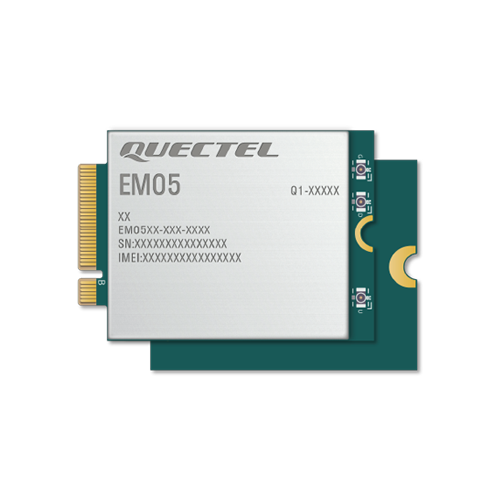
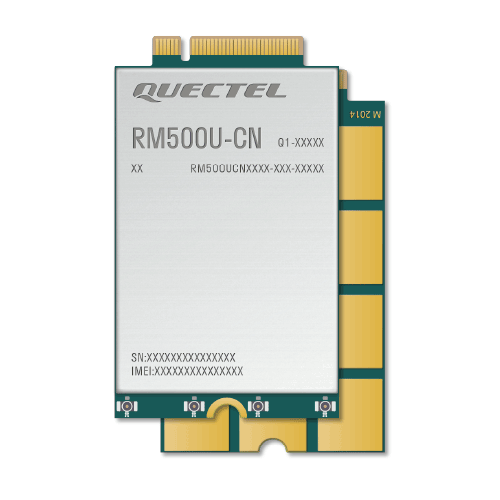
ECP1001 supports Quectel's 4G module EM05 and 5G module RM500U.
1. Device Connection
Insert the module into the pcie slot, insert the SIM card and antenna. The antenna uses the IPEX 4th generation connector.
Run lsusb in the console; if a device with the word Quectel appears, the connection is successful.
 lsusb
Bus 002 Device 001: ID 1d6b:0003 Linux Foundation 3.0 root hub
Bus 001 Device 003: ID 2c7c:0125 Quectel Wireless Solutions Co., Ltd. EC25 LTE modem
Bus 001 Device 002: ID 1a86:80a0 QinHeng Electronics USB2.0 HUB
Bus 001 Device 001: ID 1d6b:0002 Linux Foundation 2.0 root hub
Bus 004 Device 001: ID 1d6b:0003 Linux Foundation 3.0 root hub
Bus 003 Device 001: ID 1d6b:0002 Linux Foundation 2.0 root hub
2. Connect to the Internet (Dial)
On Debian and Ubuntu you can use Quectel's dialer software to establish the connection. You can compile the source code yourself or directly download the precompiled binary we provide.
Address: Quectel-CM
2.1 Compile quectel-CM from source
# Update packages
sudo apt update

# Install dependencies
sudo apt install make gcc git busybox udhcpc

# Unzip the source package
unzip Quectel_QConnectManager_Linux_V1.6.8.zip

cd Quectel_QConnectManager_Linux_V1.6.8

# Build
make
After this you will get the executable quectel-CM program.
2.2 Dialing
On Ubuntu you need to stop the default ModemManager service to avoid conflicts with dialing; Debian does not require this.
sudo systemctl stop ModemManager
sudo systemctl disable ModemManager
Dial command below; the APN depends on the mobile operator of the SIM card
# -s parameter specifies the APN for the data connection
sudo ./quectel-CM -s APN &
# APN:
China Mobile: "cmnet"
China Unicom: "3gnet"
China Telecom: "ctnet"
A China Mobile SIM was used for testing, so the command used was as follows
For example, specifying China Mobile's APN
sudo ./quectel-CM -s cmnet &
[05-29_17:04:52:385] QConnectManager_Linux_V1.6.8
[05-29_17:04:52:386] Find /sys/bus/usb/devices/6-1 idVendor=0x2c7c idProduct=0x900, bus=0x006, dev=0x002
[05-29_17:04:52:386] Auto find qmichannel = /dev/ttyUSB2
[05-29_17:04:52:386] Auto find usbnet_adapter = enx62d3d1e2dc2d
[05-29_17:04:52:386] netcard driver = cdc_ether, driver version = 6.1.99
[05-29_17:04:52:386] Modem works in ECM_RNDIS_NCM mode
[05-29_17:04:52:389] /proc/1522/fd/9 -> /dev/ttyUSB2
[05-29_17:04:52:389] /proc/1522/exe -> /usr/sbin/ModemManager
[05-29_17:04:54:405] atc_fd = 7
[05-29_17:04:54:406] AT> ATE0Q0V1
[05-29_17:04:54:409] AT< OK
[05-29_17:04:55:410] AT> AT+QCFG="usbnet"
[05-29_17:04:55:415] AT< +QCFG: "usbnet",1
[05-29_17:04:55:415] AT< OK
[05-29_17:04:55:415] AT> AT+QNETDEVCTL=?
[05-29_17:04:55:416] AT< +QNETDEVCTL: (1-8),(0-3),(0,1)
[05-29_17:04:55:416] AT< OK
[05-29_17:04:55:416] AT> AT+CGREG=2
[05-29_17:04:55:419] AT< OK
[05-29_17:04:55:419] AT> AT+CEREG=2
[05-29_17:04:55:422] AT< OK
[05-29_17:04:55:422] AT> AT+C5GREG=2
[05-29_17:04:55:424] AT< OK
[05-29_17:04:55:424] AT> AT+QNETDEVSTATUS=?
[05-29_17:04:55:427] AT< +QNETDEVSTATUS: (1-8)
[05-29_17:04:55:427] AT< OK
[05-29_17:04:55:428] AT> AT+QCFG="NAT"
[05-29_17:04:55:431] AT< +QCFG: "nat",0
[05-29_17:04:55:431] AT< OK
[05-29_17:04:55:432] AT> AT+CGMR
[05-29_17:04:55:433] AT< RM500UCNAAR03A05M2G_01.001.01.001
[05-29_17:04:55:433] AT< OK
[05-29_17:04:55:433] AT> AT+CPIN?
[05-29_17:04:55:435] AT< +CPIN: READY
[05-29_17:04:55:435] AT< OK
[05-29_17:04:55:435] AT> AT+QCCID
[05-29_17:04:55:439] AT< +QCCID: 89860040191702516660
[05-29_17:04:55:439] AT< OK
[05-29_17:04:55:439] requestGetICCID 89860040191702516660
[05-29_17:04:55:439] AT> AT+CIMI
[05-29_17:04:55:441] AT< 460028194360396
[05-29_17:04:55:441] AT< OK
[05-29_17:04:55:441] requestGetIMSI 460028194360396
[05-29_17:04:55:442] AT> AT+QICSGP=1
[05-29_17:04:55:449] AT< +QICSGP: 3,"cmnet","","",0
[05-29_17:04:55:449] AT< OK
[05-29_17:04:55:449] requestGetProfile[1] cmnet///0/IPV4V6
[05-29_17:04:55:449] requestSetProfile[1] cmnet///0/IPV4
[05-29_17:04:55:449] AT> AT+QICSGP=1,1,"cmnet","","",0
[05-29_17:04:56:281] AT< OK
[05-29_17:04:56:282] AT> AT+COPS=3,0;+COPS?;+COPS=3,1;+COPS?;+COPS=3,2;+COPS?
[05-29_17:04:56:299] AT< +COPS: 0,0,"",11
[05-29_17:04:56:304] AT< +COPS: 0,1,"N-V�y�R�",11
[05-29_17:04:56:310] AT< +COPS: 0,2,"46000",11
[05-29_17:04:56:310] AT< OK
[05-29_17:04:56:310] AT> AT+C5GREG?
[05-29_17:04:56:313] AT< +C5GREG: 2,1,"14259F","C0FC72003",11,2,01
[05-29_17:04:56:313] AT< OK
[05-29_17:04:56:313] AT> AT+QNETDEVSTATUS=1
[05-29_17:04:56:388] AT< +CME ERROR: 3
[05-29_17:04:56:388] AT> at+cops?
[05-29_17:04:56:392] AT< +COPS: 0,2,"46000",11
[05-29_17:04:56:393] AT< OK
[05-29_17:04:56:393] AT> at+qeng="servingcell"
[05-29_17:04:56:404] AT< +QENG: "servingcell","NOCONN","NR5G-SA","TDD",460,00,C0FC72003,565,14259F,504990,41,100,-87,-8,13,20,32,1
[05-29_17:04:56:404] AT< OK
[05-29_17:04:56:404] ip addr flush dev enx62d3d1e2dc2d
[05-29_17:04:56:420] ip link set dev enx62d3d1e2dc2d down
[05-29_17:04:56:426] AT> AT+QNETDEVCTL=1,1,1
[05-29_17:04:56:655] AT< OK
[05-29_17:04:56:656] AT> AT+QNETDEVSTATUS=1
[05-29_17:04:56:715] AT< +CME ERROR: 3
[05-29_17:04:57:028] AT< +QNETDEVSTATUS: 1,1,"IPV4",0
[05-29_17:04:57:715] AT> AT+QNETDEVSTATUS=1
[05-29_17:04:57:776] AT< +QNETDEVSTATUS: 10.82.96.30,255.255.255.0,10.82.96.1,,120.196.165.7,221.179.38.7,,,,,,
[05-29_17:04:57:776] AT< OK
[05-29_17:04:57:776] AT> AT+QNETDEVSTATUS=1
[05-29_17:04:57:834] AT< +QNETDEVSTATUS: 10.82.96.30,255.255.255.0,10.82.96.1,,120.196.165.7,221.179.38.7,,,,,,
[05-29_17:04:57:834] AT< OK
[05-29_17:04:57:834] requestGetIPAddress 10.82.96.30
[05-29_17:04:57:834] AT> at+cops?
[05-29_17:04:57:836] AT< +COPS: 0,2,"46000",11
[05-29_17:04:57:836] AT< OK
[05-29_17:04:57:836] AT> at+qeng="servingcell"
[05-29_17:04:57:840] AT< +QENG: "servingcell","CONNECT","NR5G-SA","TDD",460,00,C0FC72003,565,14259F,504990,41,30,-89,-6,16,20,32,1
[05-29_17:04:57:841] AT< OK
[05-29_17:04:57:841] AT> AT+QNETDEVSTATUS=1
[05-29_17:04:57:900] AT< +QNETDEVSTATUS: 10.82.96.30,255.255.255.0,10.82.96.1,,120.196.165.7,221.179.38.7,,,,,,
[05-29_17:04:57:901] AT< OK
[05-29_17:04:57:901] ip link set dev enx62d3d1e2dc2d up
[05-29_17:04:57:909] No default.script found, it should be in '/usr/share/udhcpc/' or '/etc//udhcpc' depend on your udhcpc version!
[05-29_17:04:57:909] busybox udhcpc -f -n -q -t 5 -i enx62d3d1e2dc2d
udhcpc: started, v1.35.0
udhcpc: broadcasting discover
udhcpc: broadcasting select for 10.82.96.30, server 10.82.96.1
udhcpc: lease of 10.82.96.30 obtained from 10.82.96.1, lease time 86400
[05-29_17:04:57:974] ERROR: IP from udhcpc (0.0.0.0) is different to IP from ATC (10.82.96.30)!
[05-29_17:04:57:974] AT> at+cops?
[05-29_17:04:57:977] AT< +COPS: 0,2,"46000",11
[05-29_17:04:57:977] AT< OK
[05-29_17:04:57:977] AT> at+qeng="servingcell"
[05-29_17:04:57:982] AT< +QENG: "servingcell","CONNECT","NR5G-SA","TDD",460,00,C0FC72003,565,14259F,504990,41,30,-89,-6,16,20,32,1
[05-29_17:04:57:982] AT< OK
[05-29_17:04:57:983] AT> AT+QNETDEVSTATUS=1
[05-29_17:04:58:042] AT< +QNETDEVSTATUS: 10.82.96.30,255.255.255.0,10.82.96.1,,120.196.165.7,221.179.38.7,,,,,,
[05-29_17:04:58:042] AT< OK
[05-29_17:05:13:057] AT> at+cops?
[05-29_17:05:13:062] AT< +COPS: 0,2,"46000",11
[05-29_17:05:13:062] AT< OK
[05-29_17:05:13:062] AT> at+qeng="servingcell"
[05-29_17:05:13:068] AT< +QENG: "servingcell","NOCONN","NR5G-SA","TDD",460,00,C0FC72003,565,14259F,504990,41,100,-90,-8,11,0,29,1
[05-29_17:05:13:068] AT< OK
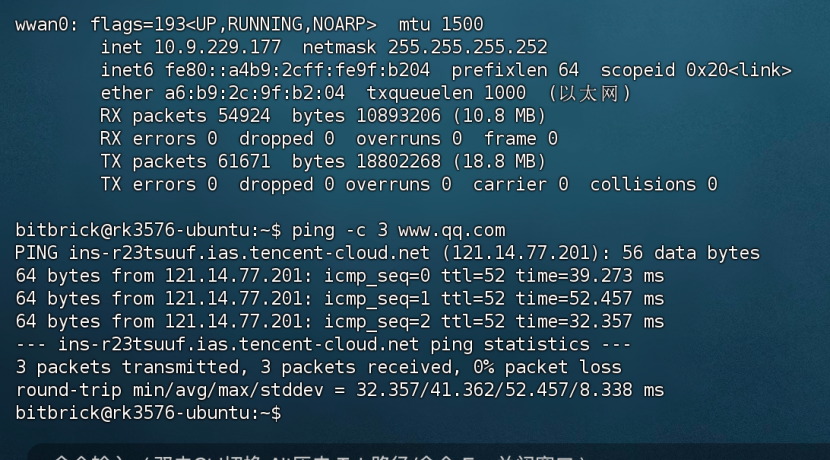
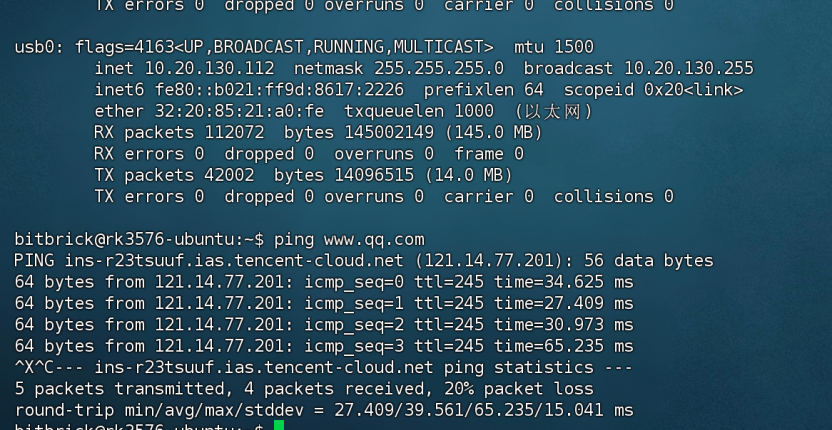
After a successful dial you can use ifconfig to see the assigned IP address
4G is wwan0
5G is usb0
If you encounter DNS issues, you can import Aliyun's DNS as follows
echo "nameserver 223.5.5.5" | sudo tee /etc/resolv.conf
3. Enable Automatic Dial on Boot
To simplify usage, copy quectel-CM into the system executable directory
sudo cp quectel-CM /usr/bin/ -f
3.1 Create script and add execution permission
sudo vim /opt/auto_quectel.sh
sudo chmod +x /opt/auto_quectel.sh
Script content below
/opt/auto_quectel.sh
#!/bin/bash

# Wait for /dev/ttyUSB to appear
while [ ! -e /dev/ttyUSB* ]; do
            sleep 1
    done

    quectel-CM
3.2 Add autostart configuration
Create a configuration file: create quectel-dial.service under /etc/systemd/system/ with the following content
[Unit]
Description=auto_quectel daemon
After=network.target systemd-udev-settle.service
Wants=systemd-udev-settle.service

[Service]
ExecStart=/opt/auto_quectel.sh
Restart=always
Type=simple
User=root

[Install]
WantedBy=multi-user.target
Enable and start the autostart service
sudo systemctl daemon-reload
sudo systemctl enable quectel-dial
sudo systemctl start quectel-dial